AI Agent Skills in 2026: The Complete SKILL.md Guide to Building, Sharing, and Managing Reusable Skills Across Tools
Most teams do not fail at AI adoption because the models are weak. They fail because the same workflow gets rewritten as a chat prompt, copied into a note, pasted into a repo file, forked into a tool-specific config, and forgotten again a week later. The work repeats, but the operating layer does not.
That is why AI agent skills matter. A skill turns a repeated workflow into a reusable package of instructions, examples, scripts, and supporting files that an agent can discover when it is relevant. Instead of re-explaining how your team reviews PRs, writes migration plans, drafts release notes, or checks a deployment, you give the agent a durable playbook.
In 2026, SKILL.md is becoming the simplest shared control surface for that playbook. But there is an important catch. Skills feel elegant when they live in one repo or one laptop. Once multiple teams, tools, and products need them, local files start drifting. That is the moment when a skill stops being a prompt convenience and starts becoming infrastructure. This guide explains the full arc, and why hosted delivery layers such as Milkey exist in the first place.
In Short
- AI agent skills are reusable workflow packages for repeated agent work, not just better prompts.
- SKILL.md is emerging as the plain-text packaging format for instructions, examples, references, and optional scripts.
- Skills are not the same thing as prompts, tools, MCP servers, rules,
AGENTS.md, or prompt files, even though they often work together. - Portability is real, but uneven. Some tools now support skills natively, while others still lean more on adjacent systems like rules, custom instructions, or
AGENTS.md. - Local skills work well at small scale. Once a team needs governance, discoverability, versioning, rollout control, and cross-tool delivery, hosted skill infrastructure becomes the next layer.
The Repeated Workflow Problem Hiding Inside Modern Agent Usage
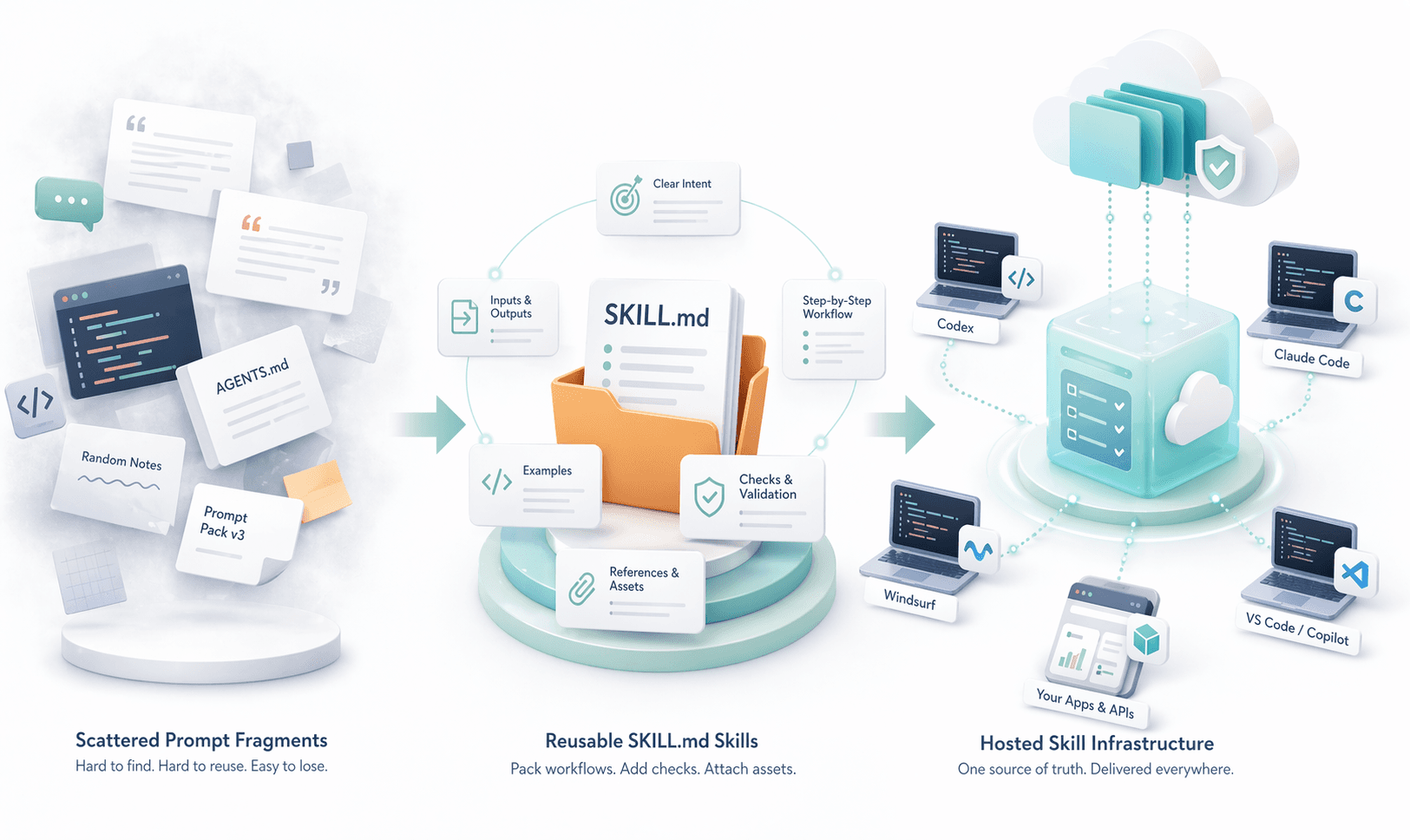
Walk through a normal engineering week and the pattern is obvious. Someone writes a careful prompt for code review. Someone else saves a better version in Notion. A third person turns half of it into AGENTS.md. A fourth person adds a Cursor rule. Another engineer creates a Claude Code skill. The workflow is now everywhere, but the team still does not have a single reusable system.
This is the operational mismatch underneath a lot of AI adoption. Teams are repeating the same jobs, but their workflow knowledge is stored as personal prompt fragments. That keeps the work brittle. Each new session starts from a slightly different operating pattern, and every tool introduces its own local dialect of instructions, commands, or context files.
Skills are the answer because they package *how the work should be done* rather than only *what to do right now*. A skill can teach an agent how to review a pull request in your house style, how to synthesize a set of product docs into a launch brief, how to run a migration checklist safely, or how to escalate a support issue when key conditions appear.
That is the non-negotiable shift this article argues for: AI agent skills are becoming the reusable workflow layer for modern agents. SKILL.md matters because it gives teams a shared authoring format. But once skills spread across products and teams, local-only management stops being enough.
What Are AI Agent Skills?
An AI agent skill is a reusable package that teaches an agent how to perform a recurring kind of work. It usually contains a short description of when to use it, task instructions, expected inputs and outputs, optional supporting files, and sometimes executable scripts or templates.
That definition matters because it separates skills from improvised prompting. A prompt is typically written for the current moment. A skill is meant to survive reuse. It should still make sense next week, in another repository, by another teammate, in another compatible agent environment.
Good skills show up wherever work repeats but correctness still matters. Coding teams create skills for release prep, debugging, code review, migrations, stack-specific patterns, and documentation. Product teams use them for user-research synthesis, PRD drafting, or changelog creation. Operations teams use them for incident triage, audit preparation, and escalation workflows. Support teams use them for consistent response drafting and internal handoff.
- A skill defines a repeatable task boundary.
- A skill can encode team-specific preferences and guardrails.
- A skill can include supporting assets such as scripts, templates, examples, or checklists.
- A skill can be discovered on demand instead of injected into every session up front.
A simple litmus test helps: if you keep typing the same playbook, correcting the same mistakes, or reassembling the same workflow from memory, you probably do not need another prompt. You need a skill.
What Is SKILL.md?
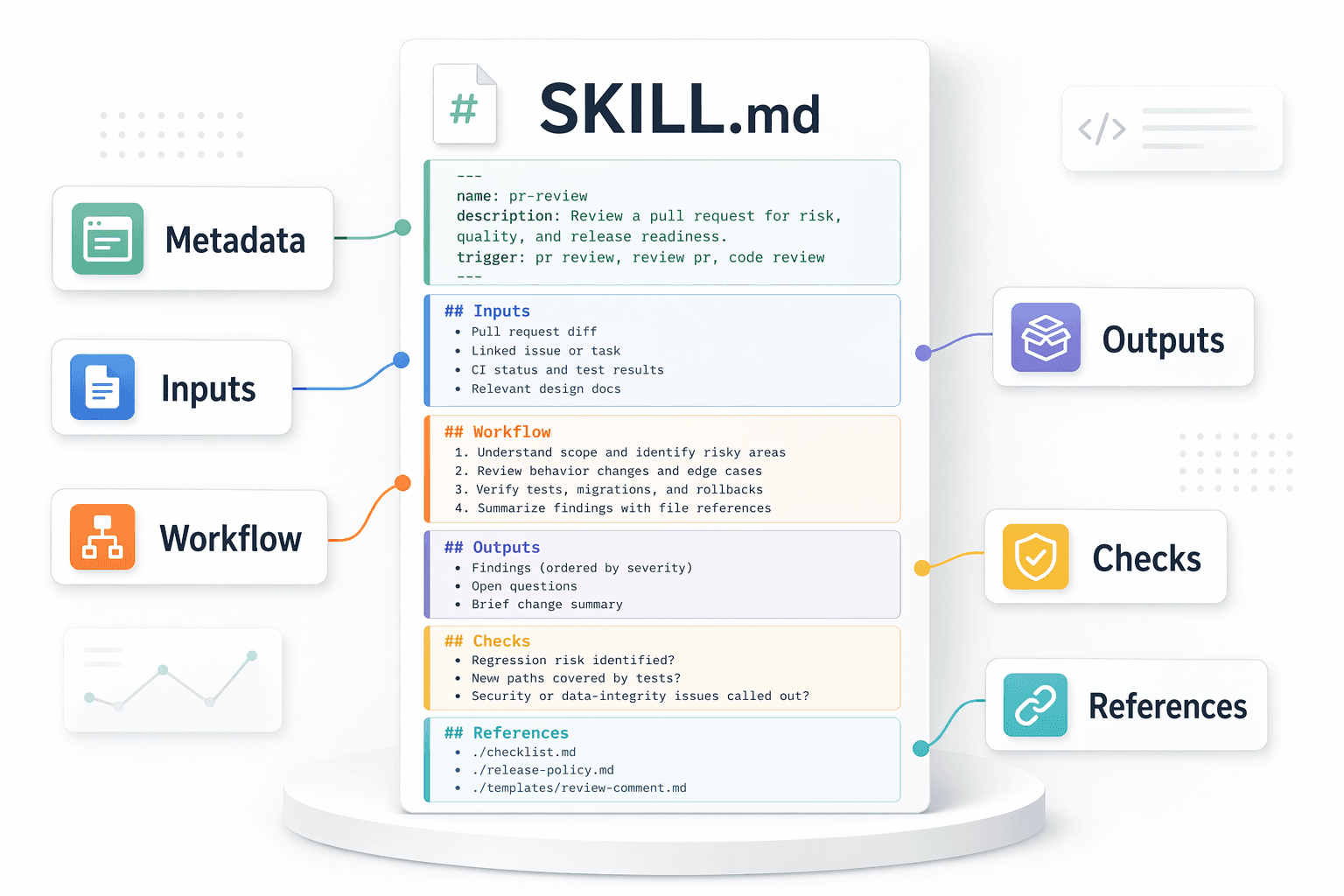
SKILL.md is the plain-text entrypoint file used by many modern skill systems. It is usually a Markdown document with YAML frontmatter at the top and workflow instructions beneath it. In practice, it acts as the control file for a skill folder: it tells the agent what the skill is called, when it should trigger, and how to execute the workflow reliably.
Markdown matters here for the same reason README.md became universal. It is easy to author, review in git, diff in pull requests, discuss in comments, and move between tools. YAML frontmatter gives enough metadata for discovery, while the Markdown body keeps the actual workflow human-readable.
As of April 23, 2026, official docs from OpenAI Codex, Claude Code, Windsurf, and GitHub Copilot in VS Code all document SKILL.md-style skills directly. That does not mean the ecosystem is perfectly standardized, but it does mean the file has become a credible cross-tool packaging surface.
md
---
name: pr-review
description: Review a pull request for regression risk, missing tests, security issues, and rollout hazards. Use when the user asks for review, sign-off, or release readiness.
---

# Pull Request Review

## Inputs
- Diff, changed files, linked issue, CI status

## Workflow
1. Read the scope and identify risky files first.
2. Check behavior changes before style issues.
3. Look for missing tests, migration risk, and rollback concerns.
4. Summarize findings in severity order with concrete file references.

## Output
- Findings first
- Open questions next
- Brief change summary last

## Checks
- Did we identify any user-visible regression risk?
- Did we verify new paths are covered by tests?
- Did we call out security or data-integrity issues?

## References
- [review checklist](./checklist.md)
- [release policy](./release-policy.md)
Skills vs Prompts vs Tools vs MCP Servers vs Rules
A lot of confusion in this category comes from collapsing several different layers into one idea. Teams say they are "using skills" when they mean prompts. Or they call an MCP server a skill. Or they store a reusable workflow in AGENTS.md and assume that is equivalent to a packaged skill. These pieces can cooperate, but they are not interchangeable.
Prompts are still useful, but they are not a workflow layer
Prompts are indispensable. You still need a current request, a goal, and local task context. But a prompt is not automatically reusable just because you saved it. Most prompt files do not carry clear boundaries, checks, or supporting resources. They often tell the model *what answer to produce*, not *how the work should reliably proceed*.
That is why skills sit one layer above prompts. A skill can include prompting, but it adds packaging, discovery, and supporting assets around the prompt.
Tools and MCP servers are complementary, not replacements
Tools let an agent act: call an API, read a file, query a database, click a UI, or run a command. MCP servers standardize how clients discover and use tools, resources, and prompts. According to the official MCP docs and SDKs, MCP's core primitives are tools, resources, and prompts rather than skills themselves.
That distinction matters. A skill is often the *workflow logic* that tells the agent when to use certain tools or MCP-exposed capabilities. The MCP server is the delivery mechanism for capabilities. The skill is the reusable playbook that makes those capabilities useful in a repeatable way.
Skills vs AGENTS.md vs prompt files
AGENTS.md is usually best for broad, persistent guidance: repo conventions, coding standards, or directory-scoped instructions. Prompt files are best for manually triggered prompt templates. Skills are best when the task needs a reusable procedure, references, examples, or supporting scripts.
You can think of it this way: AGENTS.md says how to behave in general. A prompt file says what to do for one reusable request. A skill says how to execute a recurring workflow well.
| Layer | Primary purpose | Typical form | How it is activated | Best use case |
|---|---|---|---|---|
| Prompt | Tell the model what to do right now | One message or template | User request | One-off task framing |
| Skill | Package a repeatable workflow | Folder with SKILL.md and optional assets | Explicit invocation or model relevance | Reusable procedures with references, scripts, or checks |
| Tool | Execute an action or fetch data | Function, command, API, or UI action | Agent tool call | Doing work in the world |
| MCP server | Expose tools, resources, and prompts through a standard interface | Remote or local server | Configured client connection | Shared capability delivery and system integration |
| Rule / instruction file | Shape baseline behavior | Markdown or tool-specific config | Always-on, glob, or scoped activation | Coding conventions and persistent guidance |
| Prompt file | Store a reusable single-task prompt | Markdown prompt template | Usually manual slash-command style invocation | Repeatable but still prompt-centric tasks |

How AI Agent Skills Actually Work
Modern skills systems are usually built around progressive disclosure. The agent does not load every full skill body into context at startup. Instead, it first sees lightweight metadata such as the skill name and description. When the current task seems relevant, it then loads the full SKILL.md instructions and only pulls supporting files when those are referenced.
That loading model is one of the biggest reasons skills scale better than giant always-on instruction files. Your context window stays lean until the workflow is actually needed.
Official docs make this pattern unusually consistent across tools. OpenAI's Codex docs explicitly describe progressive disclosure for skills. Claude Code, Windsurf, and VS Code's Agent Skills docs describe similar relevance-based loading and optional manual invocation. The underlying implementations vary, but the operating model is converging.
- 1.Discovery: the client scans skill locations or registries and learns the available skill names and descriptions.
- 2.Resolution: the model or user decides that a skill matches the task.
- 3.Instruction loading: the full
SKILL.mdbody enters context. - 4.Resource loading: scripts, templates, examples, or references are pulled only when needed.
- 5.Execution: the agent follows the workflow and uses tools or MCP-connected systems where required.
- 6.Return and iteration: the agent reports the result, and the team can refine the skill if the workflow missed something important.
This is also why the best skills stay small and composable. A monolithic skill that tries to be your entire engineering handbook is hard to trigger correctly, hard to test, and expensive to load. The sweet spot is narrow enough to be dependable and broad enough to be reused often.

Examples of High-Value Skills
The highest-value skills are almost always attached to real repeated work. They save time, but more importantly they compress review effort because the workflow becomes more predictable.
Coding workflow skill
A pr-review or fix-failing-ci skill can take changed files, test results, and a linked issue as inputs. Outputs might include a severity-ordered review, a concise patch plan, and required follow-up checks. Reuse benefit: every review starts from the same risk model instead of one engineer's memory.
Checks often include regression risk, missing tests, data integrity, rollback implications, and security-sensitive paths. This is a perfect fit for skills because the workflow is procedural, the standards are team-specific, and supporting references matter.
Technical writing skill
A release-notes or sdk-doc-update skill can take diffs, changelog fragments, and issue labels as inputs. Outputs might include an answer-first summary, breaking changes, migration steps, and copy-safe examples. Reuse benefit: docs stay structurally consistent even when written by different people or tools.
This kind of skill is where a prompt template usually breaks down. Writing quality depends on tone, structure, fact checks, and what should be omitted. A skill handles that better than a short reusable prompt.
Research synthesis skill
A research-brief skill can take links, uploaded documents, or notes as inputs and produce findings, contradictions, decision-ready takeaways, and open questions. Reuse benefit: long-source synthesis stops turning into a wall of summary text and starts turning into a repeatable decision artifact.
The skill can also encode citation rules, confidence labeling, and what counts as evidence versus inference. Those are the sorts of quality controls teams forget when they rely only on free-form prompting.
Data analysis skill
A metrics-anomaly-review skill can take a CSV or dashboard export plus a date range. Outputs might include the top anomalies, likely causes, required validation steps, and a short executive summary. Reuse benefit: everyone gets the same analytical frame before drawing conclusions from noisy data.
This is especially useful when the workflow includes scripts, SQL templates, charting notebooks, or threshold definitions that should travel with the skill.
Customer support or internal ops skill
A tier-2-triage skill can take a support thread, account status, and product logs. Outputs might include a customer-facing answer draft, an internal escalation summary, and a checklist of missing facts. Reuse benefit: support handling becomes faster without losing policy consistency.
Operationally, these skills become valuable very quickly because mistakes in wording, escalation, or policy references can create real downstream cost.
Notice the pattern: inputs are concrete, outputs are structured, and checks are explicit. That is what separates a good skill from a clever prompt.
Cross-Tool Portability in 2026
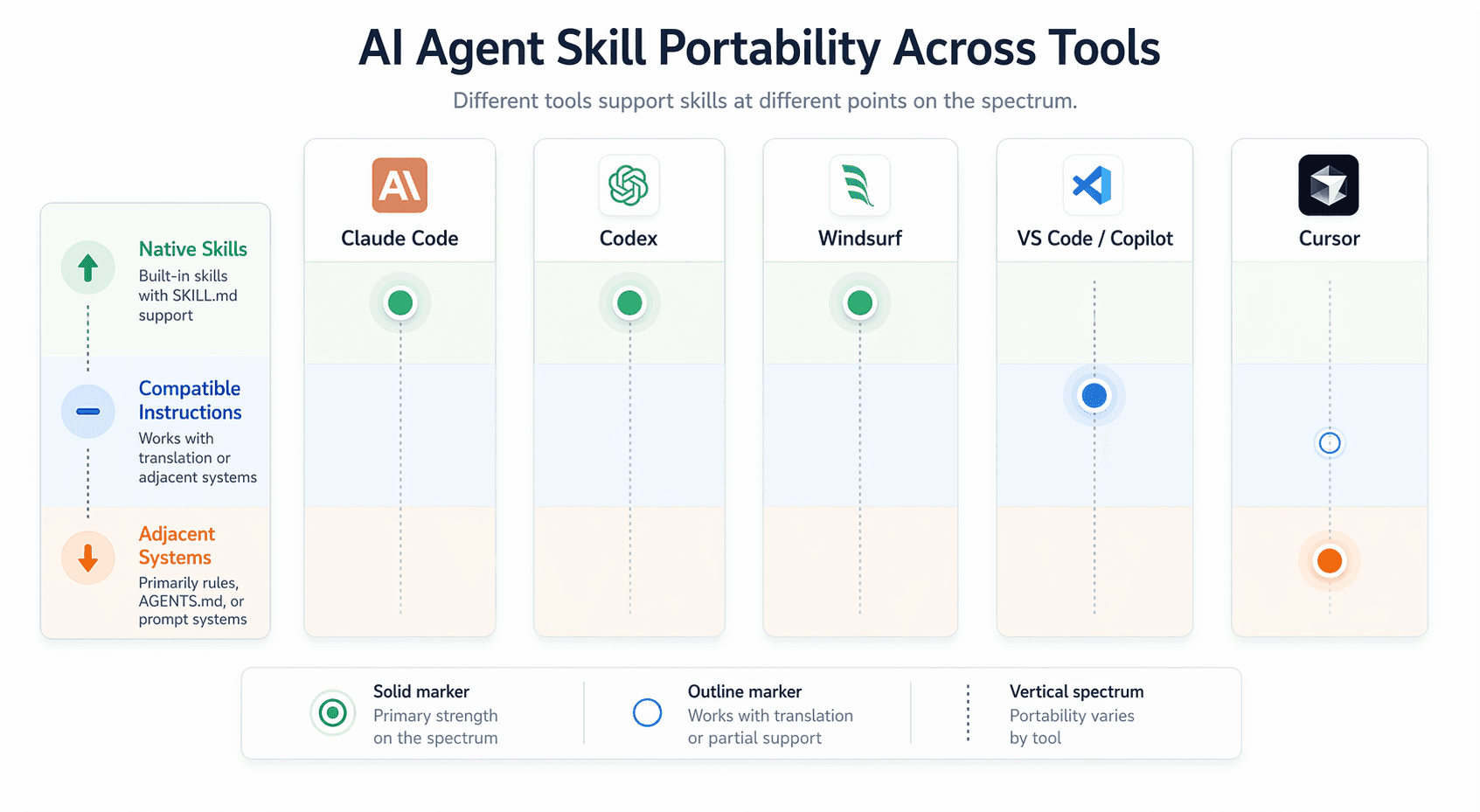
Portability is real, but it is not binary. The honest model is a spectrum: some tools support skills natively, some support a compatible or nearly compatible SKILL.md workflow, and some rely more heavily on adjacent systems like rules, AGENTS.md, prompt files, or custom instructions.
As of April 23, 2026, official docs show strong native skill support in Codex, Claude Code, Windsurf, and GitHub Copilot / VS Code. VS Code custom instruction docs also document adjacent file types such as .github/copilot-instructions.md, .instructions.md, AGENTS.md, and CLAUDE.md. Cursor's official rules docs remain centered on .cursor/rules and AGENTS.md, while Cursor's official learn and product materials also describe dynamically loaded skills. The portability story is improving, but the ecosystem is still settling.
The practical takeaway is simple: treat workflow logic as portable, even when file formats differ. If you author skills clearly, keep metadata light, and separate always-on guidance from on-demand procedures, you can usually adapt the same workflow across tools without rewriting it from scratch.
| Tool | Native skills | Adjacent systems | Portability reality | Main friction point |
|---|---|---|---|---|
| Claude Code | Yes | CLAUDE.md, subagents, hooks, slash commands | Strong native SKILL.md support with extras such as invocation control and dynamic context injection | Some Claude-specific extensions go beyond the baseline format |
| Codex | Yes | AGENTS.md, plugins, rules, MCP | Strong native skills support plus plugin packaging for broader distribution | Codex-specific metadata and plugin packaging can add a second delivery layer |
| Windsurf | Yes | Rules, AGENTS.md, workflows, memories | Native skills with clear separation between skills, rules, and workflows | Users still need to choose carefully between three overlapping customization types |
| VS Code / GitHub Copilot | Yes | Custom instructions, prompt files, custom agents, hooks, AGENTS.md | Native Agent Skills support is now documented, but teams often mix it with several other customization surfaces | Governance gets messy when instructions, prompt files, and skills all coexist |
| Cursor | Emerging / mixed | Project rules, team rules, AGENTS.md, CLI compatibility | Core workflow logic can be reused, but the most stable documented surface is still rules plus AGENTS.md | Tooling and docs are less settled than the clearer SKILL.md implementations elsewhere |
How Teams Should Structure and Govern Skills
The easiest way to make skills unusable is to treat them like a dumping ground for every convention your team has ever discussed. A good skill library behaves more like an internal product surface than a random folder of prompts.
That means governance matters early. Not enterprise-bureaucracy theater. Just enough structure that a teammate can discover the right skill, trust who owns it, understand the version, and know whether it is still safe to use.
- Use descriptive, stable names such as
pr-review,debug-flaky-test, orrelease-notes. - Keep scope narrow. A skill should do one job well instead of trying to be your whole engineering handbook.
- Version important changes and record why the behavior changed.
- Assign ownership so every skill has a human team responsible for its quality.
- Review skill edits the way you review code: with diffs, comments, and clear acceptance criteria.
- Deprecate intentionally. Broken or outdated skills are worse than missing skills because they create false confidence.
Testing and review should match the blast radius
A minor copy-editing skill might only need spot checks. A deployment or security-review skill should be tested against representative scenarios, expected outputs, and known failure modes. Teams that skip this end up trusting unproven automation because the file *looks* structured.
The best review loop is brutally practical: sample inputs, expected outputs, failure examples, and a quick note about what changed since the last version.
Avoid god skills
A "full-stack-engineering-master-skill" is almost always a smell. It is hard to invoke correctly, expensive to load, and impossible to own. Split general project rules into AGENTS.md or instructions files, then create smaller skills for concrete procedures.
Composability is the point. One skill for review. One for migration planning. One for release prep. One for incident write-ups. That keeps discovery clean and invocation logic sane.
Security and auditability are part of the design
If a skill references scripts, privileged tools, internal docs, or customer data pathways, you should know who added those dependencies and who approved them. Reusable skills quietly become a policy surface as soon as they can trigger actions beyond plain text generation.
That is one of the reasons local prompt packs stop being enough. You eventually need audit trails, policy boundaries, and confidence about what is being distributed to whom.
The Operational Problem With Local Skills
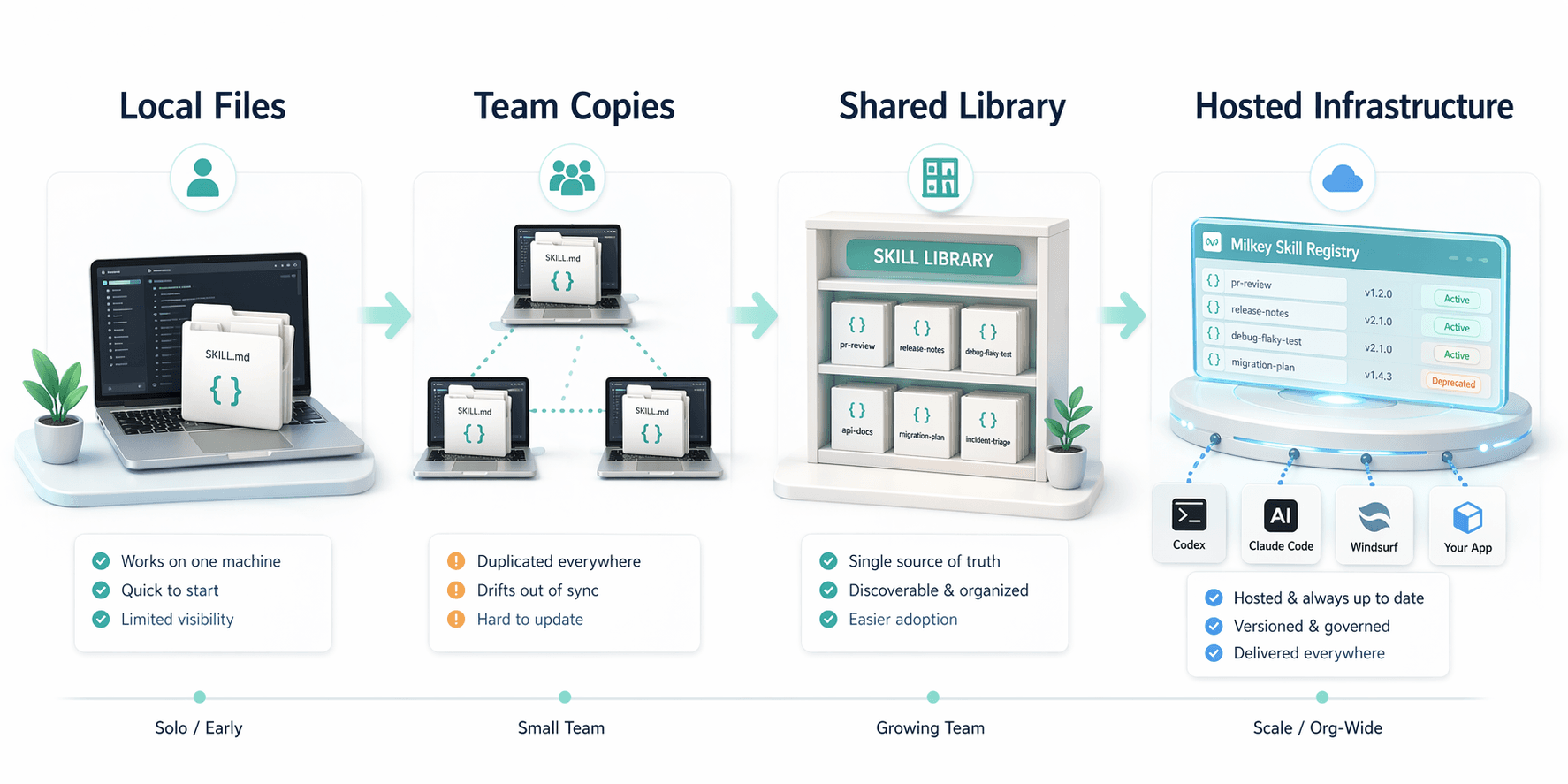
Local skills are excellent for the first phase of adoption. They are easy to experiment with, easy to diff, and close to the repo. For a solo developer or a small team inside one environment, they can be enough for quite a while.
The problem shows up when skills stop being personal and start becoming shared dependencies. Now you need to know which copy is current, who changed it, which tools can access it, how updates roll out, and whether everyone is using the same version. Local folders answer none of that cleanly.
This is where teams run into the same operational problems they once hit with shell scripts, config sprawl, and internal runbooks. The workflow exists, but the delivery path is unreliable.
- Duplicated copies across repos and laptops
- Behavior drift between tools because each client keeps its own local variant
- No reliable single source of truth
- Weak discoverability once the number of skills grows past a handful
- No controlled rollout path for updates or deprecations
- Unclear access control for skills that should not be universal
- Poor auditability when scripts or sensitive references are bundled
- Difficult reuse across coding agents, MCP-connected apps, and product workflows
There is a subtle but important category transition here. At small scale, skills are files. At larger scale, skills become shared operational assets. The infrastructure question arrives whether a team planned for it or not.
This is also the right moment for a soft product reality check. If your team is already juggling local folders, repo copies, and tool-specific variants, it is worth reading what an AI agent skills library should look like before that drift becomes expensive.
Why Hosted Skill Infrastructure Becomes Necessary
Hosted skill infrastructure exists for the same reason hosted package registries, hosted feature-flag systems, and hosted CI layers exist. Teams eventually need a control plane for shared operational artifacts.
In the skill world, that control plane usually needs to do five things well: register skills centrally, make them discoverable, deliver them consistently, govern who can change or use them, and expose them through the delivery channels real teams already rely on.
The ecosystem is also moving toward more formal discovery patterns around MCP itself. The official MCP Registry is a server metadata registry, not a skill registry, but it points in the same direction: once capabilities become part of production workflows, discoverability and standardized delivery stop being optional.
- 1.Central registry: one canonical location for skill definitions and metadata.
- 2.Discoverability: search, categorization, and clear ownership so teams can find existing skills before rewriting them.
- 3.Version control and rollout: controlled updates, deprecations, and confidence about who is using which version.
- 4.Hosted delivery: the same skill should be retrievable across tools instead of manually copied into each environment.
- 5.Governance and access: approvals, auditability, permissions, and confidence about scripts or references bundled with the skill.
- 6.Cross-surface access: the same library should be usable from coding agents, MCP-connected tools, internal apps, and SDK-based product workflows.
Once you frame the problem this way, the category becomes obvious. Teams do not need hosted infrastructure because local files are bad. They need it because reusable workflows become *organizational assets*, and organizational assets need management.
How Milkey Fits
Milkey sits exactly at this operational layer. It gives teams one place to manage reusable skills, then deliver those skills across agent tools and product surfaces through hosted MCP, API, and SDK paths. The value is not just storage. It is consistent delivery from one source of truth.
That matters when a skill should work in more than one place. Your coding agent might need it in Codex or Claude Code. Your product team might want the same workflow inside an internal app. Your platform team might want to expose it through an SDK. Those are distribution problems as much as authoring problems.
In practice, Milkey helps teams reduce local file sprawl, avoid copy-paste drift across tools, and standardize on one system for ownership, updates, and retrieval. If you are evaluating the MCP side specifically, the useful starting points are the Milkey MCP docs, the setup guide, and the "what are MCP skills?" explainer.
- 1.Use local skill folders when you are still prototyping and learning what a good workflow looks like.
- 2.Move to Milkey when the same skill needs to be shared across people, repos, or tools with confidence.
- 3.Use Milkey's hosted MCP, API, and SDK paths when the skill should live beyond one local agent environment.
That is the right framing for the product. Milkey is not trying to replace the concept of skills. It is the infrastructure layer teams reach for when skills become important enough to manage seriously.
Common Mistakes That Keep Skills From Scaling
Most teams do not fail because they chose the wrong file format. They fail because the workflow itself was never made concrete enough to reuse safely.
- Treating
AGENTS.mdas a replacement for every on-demand workflow - Stuffing too much background context into a skill instead of keeping it focused
- Skipping examples and checks because the model "already knows" the task
- Overstating portability instead of documenting what adapts cleanly and what needs translation
- Waiting too long to centralize once multiple teams are already sharing unofficial copies
| Bad skill | Good skill |
|---|---|
| Vague description like "help with engineering tasks" | Explicit trigger description that says when the skill should and should not be used |
| Monolithic instructions covering half the company | One workflow with clear boundaries and references to nearby supporting files |
| No output format or checks | Defined outputs, failure conditions, and validation points |
| Copies huge docs into the body | References canonical files, templates, and examples instead of duplicating them |
| No owner, no review, no update path | Named ownership, review flow, and visible change history |
How to Get Started This Week
If you want to move from prompt chaos to reusable skills quickly, the first step is not a massive migration. It is one repeated workflow, written clearly enough that another engineer could trust it.
- 1.Pick one workflow your team repeats every week, such as PR review, flaky-test debugging, release-note drafting, or support escalation.
- 2.Write a small
SKILL.mdwith a strong description, step-by-step workflow, output shape, and checks. - 3.Keep the skill narrow. Move broad repo guidance into
AGENTS.mdor instruction files instead. - 4.Test the skill on three real examples and note where it triggers too often, too rarely, or produces weak output.
- 5.Add supporting files only when they remove ambiguity: a checklist, template, script, or reference doc.
- 6.Decide whether the workflow needs to live only in one repo or whether it should be shared across tools and products.
- 7.If the answer is shared delivery, explore Milkey home, Milkey docs, Milkey SDK docs, and Milkey pricing so you can centralize before drift turns into cleanup work.
That small move is usually enough to make the difference clear. Once one workflow becomes reusable, the rest of the organization suddenly sees that skills are not a prompt hack. They are a real operating layer.
Key Takeaways
- AI agent skills are reusable workflow packages, not just saved prompts.
SKILL.mdis emerging as the plain-text authoring surface for skills because it is portable, reviewable, and easy to pair with supporting files.- Skills, prompts, rules, tools, MCP servers,
AGENTS.md, and prompt files each solve different layers of the agent stack. - Cross-tool portability is strongest where tools support skills natively, but the broader pattern still works across adjacent instruction systems.
- Local skills are the right starting point. Hosted infrastructure is the right next step once governance, versioning, discoverability, and cross-tool delivery matter.
- Milkey fits at that operational layer by centralizing skill management and delivering reusable skills across MCP, API, and SDK paths.
FAQ
What are AI agent skills in simple terms?
AI agent skills are reusable packages of instructions, references, and optional scripts that teach an agent how to perform a recurring workflow consistently.
What is SKILL.md used for?
SKILL.md is typically the entrypoint file for a skill folder. It defines the skill metadata and the workflow instructions the agent should follow when the skill is invoked.
How are skills different from prompts?
Prompts frame a task for the current moment. Skills package a reusable workflow with clearer triggers, structure, outputs, and supporting resources for repeat use.
Are MCP servers the same thing as skills?
No. MCP servers expose capabilities such as tools, resources, and prompts. Skills are reusable workflows that can tell an agent how and when to use those capabilities.
Which tools support SKILL.md or native skills today?
As of April 23, 2026, official docs show native or direct skill support in Codex, Claude Code, Windsurf, and GitHub Copilot in VS Code, while Cursor still centers more of its documented workflow around rules and AGENTS.md even as its product materials increasingly reference skills.
When do local skills stop being enough?
Local skills usually stop being enough when the same workflows need to be shared across multiple people, repositories, tools, or products with version control and rollout confidence.
Why would a team use a hosted skills platform like Milkey?
A hosted skills platform gives teams a central registry, discoverability, governance, version control, and consistent delivery across coding agents, MCP integrations, and product workflows.
Start centralizing reusable skills before they sprawl
See how hosted skills work in Milkey, then connect the same workflow layer across agent tools, MCP, and product code.
Explore MilkeyRelated Reading
Continue through our content cluster with related posts and guides.
Milkey home
See the hosted platform for managing and delivering reusable skills centrally.
Milkey docs
Read the core docs for setup, concepts, and integration paths.
Milkey MCP docs
Understand the hosted MCP delivery path for reusable skills.
Milkey SDK docs
Use the same skills layer inside your own product workflows and internal tools.
Milkey skills reference
Review the product-side skills documentation and supporting concepts.
What are MCP skills?
See how hosted skill delivery differs from local prompt fragments and generic MCP setup.
MCP skills examples
Explore concrete workflow examples that map to coding, writing, and analysis work.
AI agent skills library guide
Learn why teams eventually need a central place to organize and govern reusable skills.
How to build AI agent skills
Start with the practical skill design guide once you understand the category.
Milkey pricing
Review the pricing path when you are evaluating team rollout instead of local-only experimentation.